Intent Amplifier

Get the right answer
on the first try

One button on Claude, ChatGPT, Gemini, and 21 other AI chats. It asks you a question or two, shows you what it understood, then writes the prompt for you, keeping your own words. You stop rewriting the same prompt five times.

Try it now no install needed
Real engine, live
Your rough prompt
Amplified prompt Your words, kept
Type your own rough idea on the left, then hit Amplify. This runs on the real engine, not a mockup.

This demo runs on the real engine. The extension is free on the Chrome Web Store.

Add to Chrome
Works right inside 24 AI chats and counting · Powered by Llama
ClaudeChatGPTGeminiPerplexityGrokCopilotDeepSeekMeta AILe ChatPoeManusHuggingChat
QwenKimiZ.aiGensparkSkyworkOpenRouterT3T3 ChatPiFeloArenaAndiJJulius

Intent Amplifier clarifies * what you mean, amplifies * it without inventing a thing about you, and hands back a prompt * worth sending, from first idea to final answer.
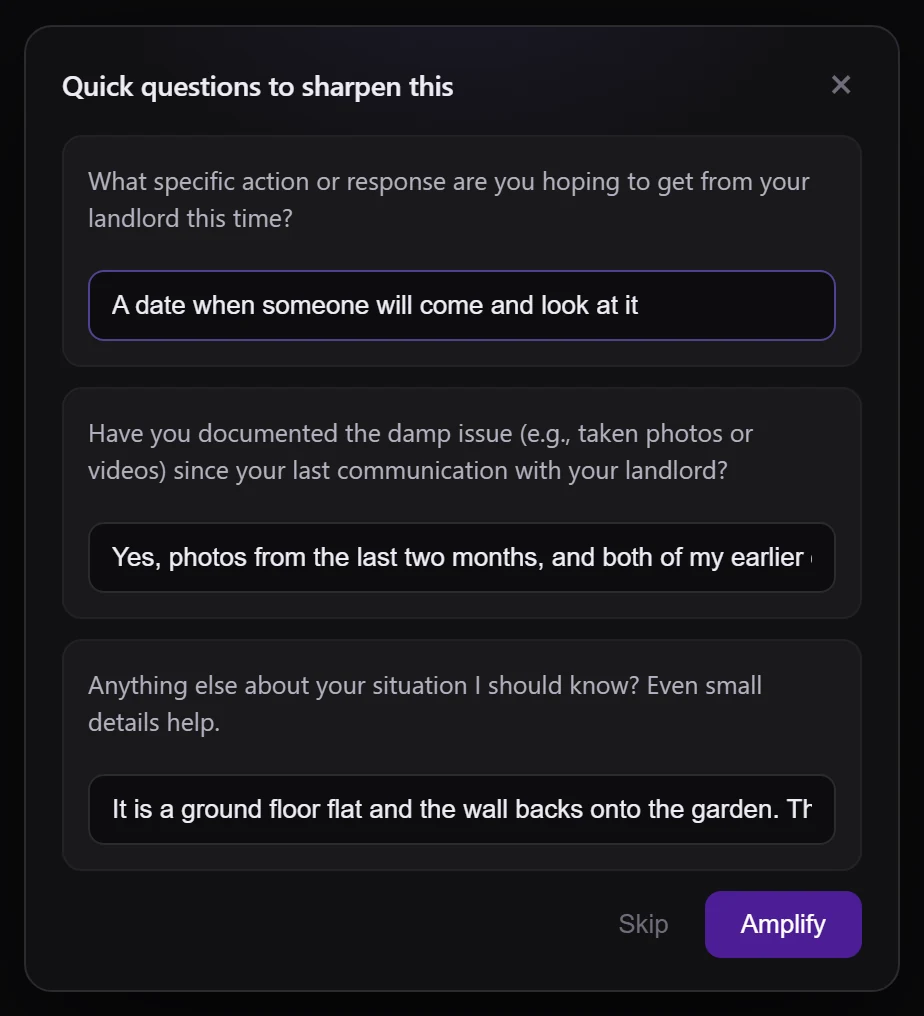
The extension asking three clarifying questions about an email to a landlord, with the answers typed in

Ask before it writes

It reads your request and, when something's missing, asks a sharp question or two. It never quietly assumes what you meant.
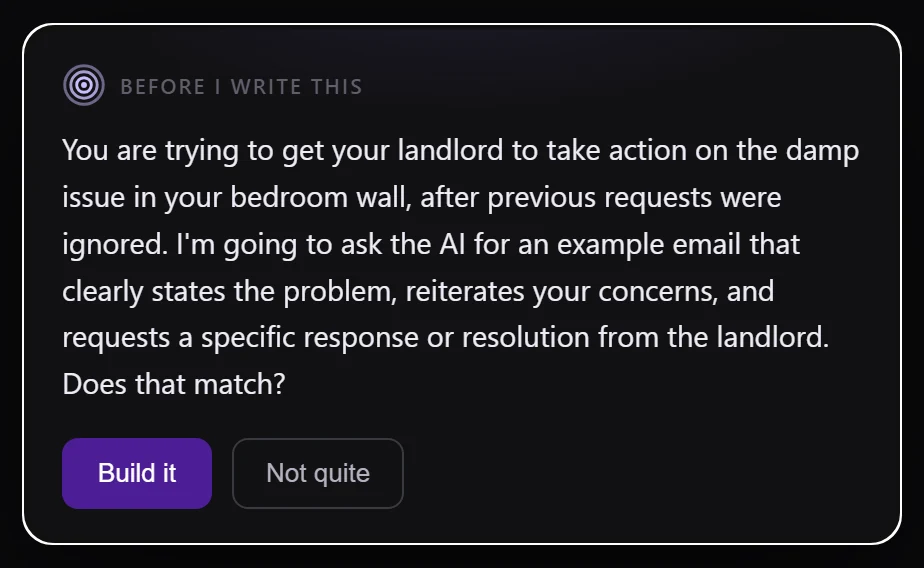
The extension stating what it understood and what it is about to ask for, with Build it and Not quite buttons

It shows you its read first

Before it writes, it tells you what it understood and what it is about to ask for. If that is wrong, you correct it in one line and it starts from your correction.
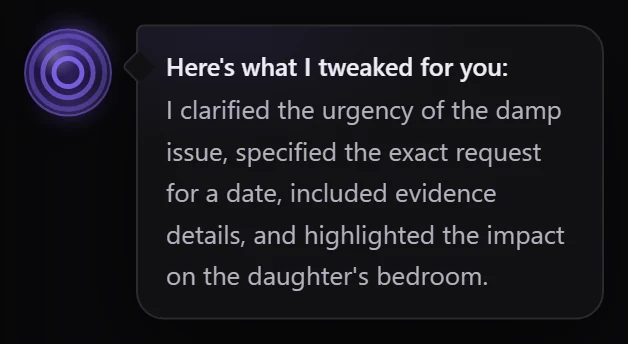
The extension's note after amplifying: a few things I cleaned up, then the list in plain English

See what got sharpened

Every time you amplify, a plain-language note tells you exactly what changed and why. No jargon, no mystery.


Made for anyone who types into an AI

A founder walking her team through a plan on a wall of sticky notes
Founders
From one-liner to a real brief

Turn a rushed idea into a prompt that gets a usable answer the first time.

A fountain pen drafting copy on paper
Marketers & writers
Copy that lands the first draft

Borrow a proven angle instead of coaxing the model with ten follow-ups.

Code on a dark editor screen
Developers
Specs the model can act on

State the deliverable up front so you get code, not a wall of caveats.

"What makes an AI answer worse is material that isn't true of the person asking. Almost everything this product does, and several large things it stopped doing, follow from that one sentence."

The Intent Amplifier team
on the one idea worth understanding
01

It asks the right question first

Before it writes a word, it works out whether it actually needs more from you. A quick rewrite? It just does it. Something it could get wrong? It asks you first, then builds on your answer.

How it decides
Spots a simple rewriteSpots a plain lookup Sticks to what you saidNever invents a topic No wasted questions
A couple of quick questions
What should readers do after reading?
Book a call Buy now Join waitlist
What's the promised outcome?
Skips the questions when your request is already clear
02

We switched off our own best feature

We spent months building a library of 59 experts and 1,224 pieces of their thinking, pulled from their books and talks. Then we measured whether pasting it into your prompt actually helped. It didn't. So we turned it off.

Head-to-head, 108 blind comparisons
With expert notes pasted in28.7%
Without them71.3%

What makes an answer worse is material that isn't true of you. The test that proved it: swap the expert's notes for a random stranger's personal background and the score barely moves, 26.2%. The library still works out which field you're in. It just doesn't put words in your mouth.

See everything we measured →
What still happens
Works out the field you're inon
Keeps your own words, word for wordon
Pastes expert notes into your promptoff
Nothing invented. Your own message is carried into the finished prompt word for word, so the AI reads what you actually said rather than our summary of it.
03

You say six words.
It sends the whole thought.

When you type "write a sales page for my course", the orb asks what the course is, who it is for, and what people get out of it. Then it turns your six words into the request you would have written if you had the time.

It never names a framework, never lectures you, and never answers the task itself. It hands you a sharper prompt and gets out of the way.

Built to disappear
No forced templatesNo jargon One-tap undoNothing to configure Freeform proseYou stay in control
What you typed
Tap the orb
Your amplified prompt

Your own words, sent along with it
  • clarified the target audience
  • specified the course outcome
  • included the price and duration
  • highlighted instructor experience
In your chat box. Ctrl+Z to undo. Done
FROM THE PROMPT BOX

Loved by people who live in an AI chat all day

"I stopped rewriting my prompts five times. It asks one smart question and the answer comes back usable."

Thulani N.
Thulani N.
IT manager

"The 'what I sharpened' note is the killer bit. I can see exactly why the new prompt is better."

Zwelakhe M.
Zwelakhe M.
Social media

"It shows me what it thinks I want before it writes anything. Half the time I fix one word there and the whole answer changes."

Mosa K.
Mosa K.
Student

"I run work for a handful of clients. A rough brief goes in and a sharp prompt comes out, so I skip the back-and-forth and just deliver."

George M.
George M.
Freelancer

"I use it for essays and study prompts. I type the messy version of what I want and it hands back something that actually gets me a proper answer."

Kaelo M.
Kaelo M.
Student
PRIVACY

Private by design.
Yours by default.

Read the privacy note →
Your prompts stay yours
The extension holds no account and no keys. You sign in only on the web, and sharing anonymized data is off by default.
No training on your data
Nothing you type is ever trained on, by us or by anyone else. The product was built without needing your data at all.
CHANGELOG

The Latest

JUL 11, 2026

A faster engine

A ground-up rebuild makes every amplify around 30% faster, with one fewer step behind the scenes and no loss in quality.

JUL 11, 2026

Your profile and your devices

Add a photo and a display name to your account, and see every device you are signed in on, each with a friendly name you can manage.

JUL 4, 2026

Teams that share what works

Share a great prompt with your team, mark the ones that worked, and see your team brand voice right in the reveal, so good prompting spreads.

See all releases →

The right answer.
First try.